

Access levels
Understanding permission settings and role-based access in SupporterBase
The permission settings in SupporterBase balance autonomy and oversight. Captains and vice-captains get the freedom to manage their groups day-to-day, while admins maintain consistency, quality, and compliance across the whole organisation.
Core permissions by role
| Capability | Admin | Captain | Vice-Captain |
|---|---|---|---|
| Access all features across all groups | Yes | No | No |
| Send bulk communications without approval | Yes | Yes (own groups); SMS blasts only while Captains can approve, edit and send/schedule SMS blasts (including those created by vice-captains) is on | No (draft only) |
| Send 1-1 communications | Yes | Yes (own groups) | Yes (own groups) |
| Require approval for bulk sends | No | No | Yes |
Admins
Full permission to use all features across all groups, without requiring any approvals. This ensures top-level oversight, troubleshooting, and cross-group strategy coordination.
Captains
Can send bulk communications without approval for the groups they lead. This lets them mobilise supporters quickly and effectively, without bottlenecks, while remaining accountable to admins. For SMS blasts this depends on the Captains can approve, edit and send/schedule SMS blasts (including those created by vice-captains) setting, which is on by default.
Vice-Captains
Can send 1-1 communications for the groups they lead and draft bulk communications, but require approval to send them. This provides a clear pathway for developing leadership capacity. Vice-captains can take initiative, but there is a safeguard to prevent missteps before messaging reaches large supporter lists.
Why tiered permissions matter
This system helps distribute responsibility, build confidence in emerging leaders, and maintain consistency in supporter experience. Bulk messaging can have a big impact on how supporters engage with your group and with the organisation as a whole, so it makes sense for newer leaders to learn by drafting and having their work reviewed before sending.
For more information on managing access levels, see the managing volunteer leaders guide.
Customising permissions
Admins can customise some permission sets via Settings > Configurations to fit the needs of their organisation. The toggles differ in who they apply to:
- Captains and vice-captains can see supporters' email addresses, phone numbers, birthdates and occupations in groups they lead
- Captains and vice-captains can add new supporters to their groups
- Captains can edit supporter email addresses, phone numbers and mobiles in groups they lead
- Captains can export the supporter details list for groups they lead
- Vice-captains can edit event details, and edit the content on public group pages, for groups they lead
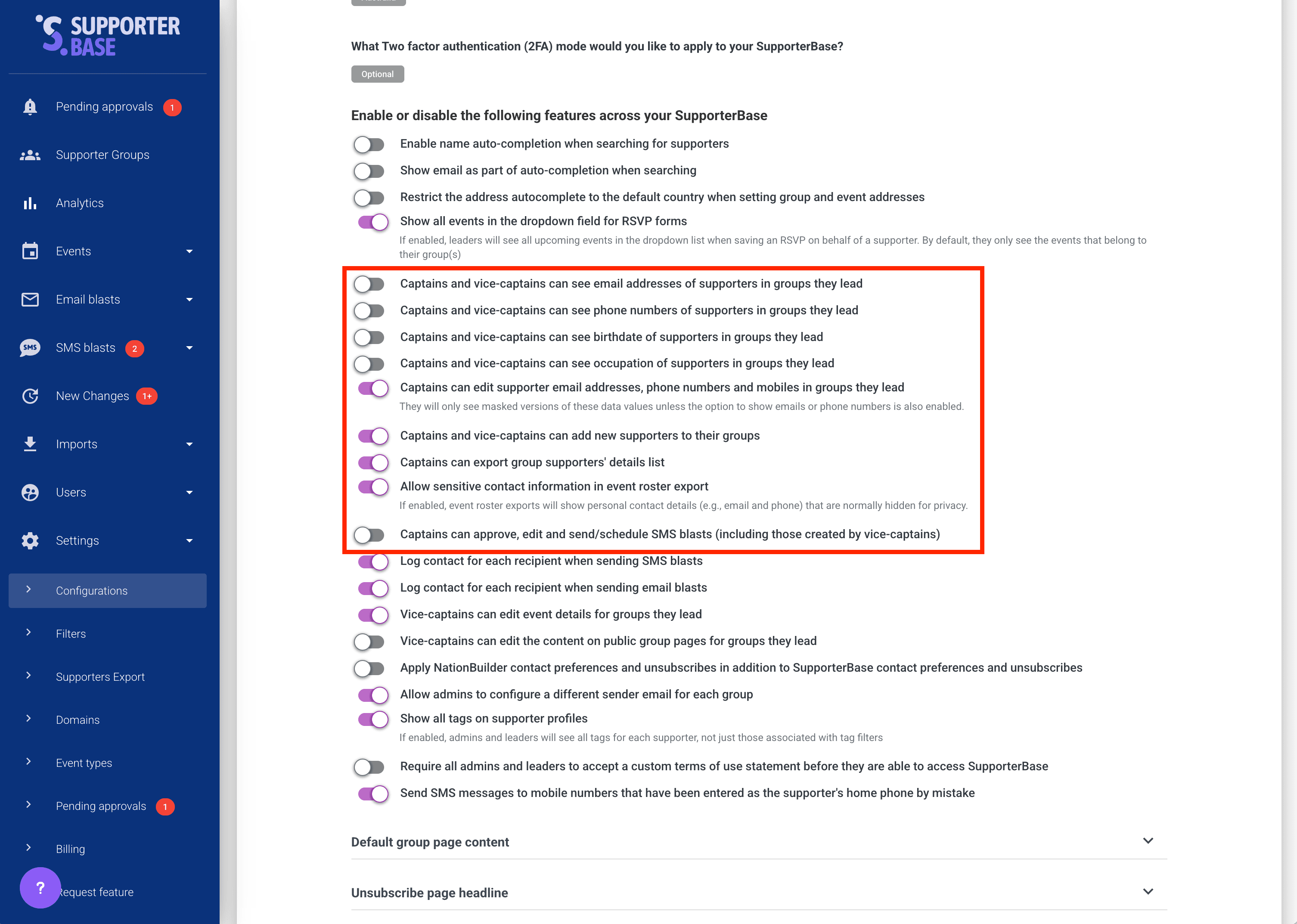
For a full breakdown see the configurations reference guide.